What is a DVI Connector?
DVI (Digital Visual Interface) is an audio and video transmission interface designed to connect computers to display devices such as monitors and projectors. It became widely adopted in the early 2000s and was primarily used to transmit high-quality digital video signals. DVI was an important technology developed to replace the traditional analog VGA interface.
Although the market has largely transitioned to HDMI and DisplayPort (DP) as the mainstream display interfaces, DVI connectors can still be commonly found in many older computers, servers, and industrial equipment.
Core Specifications and Transmission Links
Based on pin configuration and bandwidth architecture, DVI is primarily divided into the following two transmission link types:
- Single Link: Supports resolutions up to 1920×1200 @60Hz (WUXGA).
- Dual Link: Features additional pins and doubled bandwidth. It supports resolutions up to 2560×1600 @60Hz or 1920×1080 @144Hz, and was commonly used with early high-refresh-rate gaming monitors.
Three Common DVI Interface Types
One of the most confusing aspects of DVI is that it is available in several connector configurations. When selecting a DVI cable, special attention should be paid to the pin arrangement on the connector.
| Interface Type | Signal Type | Connector Identification | Typical Application |
|---|---|---|---|
| DVI-D (Digital) | Digital signal only | A single flat horizontal blade on the right side (minus sign) | Used for connecting digital display devices and the most common DVI type. |
| DVI-A (Analog) | Analog signal only | A cross-shaped blade with four additional pins on the right side | Essentially a VGA interface in a different connector housing; now extremely uncommon. |
| DVI-I (Integrated) | Integrated digital and analog signals | A cross-shaped blade with four additional pins on the right side | Provides broad compatibility and can be converted to VGA using a passive adapter. |
Advantages and Disadvantages of DVI
Key Advantages
- Digital Signal Transmission
Compared with the analog signal of VGA, DVI digital transmission is less susceptible to noise interference, resulting in clearer images and more accurate color reproduction. - Secure Screw-Locking Mechanism
DVI connectors feature manually tightened screws on both sides, providing a secure connection that helps prevent accidental disconnection caused by pulling or cable movement. This makes DVI suitable for industrial and server environments. - High Compatibility
The digital video signal of DVI-D is fully compatible with early HDMI 1.0–1.2 standards and can be interconnected using a simple adapter.
Key Disadvantages
- No Standard Audio Transmission
DVI is designed primarily for video transmission and does not normally carry audio signals. Although some graphics card manufacturers implemented non-standard methods to output audio through DVI, this is not a mainstream application. - Large Form Factor
Compared with HDMI and DisplayPort, DVI connectors and cables are relatively large and bulky, making them unsuitable for slim and lightweight laptops. - Resolution Limitations
DVI supports resolutions up to 2K and cannot meet the requirements of modern 4K/8K video, high-refresh-rate displays, or HDR applications.
Where to Buy DVI Connectors
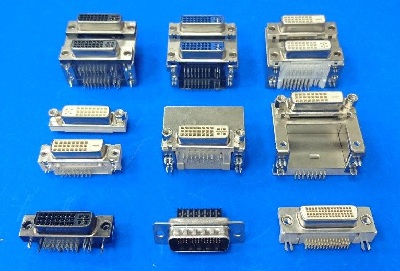
DVI Connectors can be considered a legacy product. Taiwanese manufacturers such as Chun Chi Industrial Co., Ltd. and Anytronic Corporation Limited have been producing DVI Connectors since 1988. Available in LCP and PBT materials, these products are offered in a wide range of configurations, specifications, and colors.
DVI Connectors are widely used in laptop computers manufactured before 2014, desktop computers, graphics cards, monitors, and various other electronic devices.
Introduction to DVI Connector Specifications and Component Names